Description
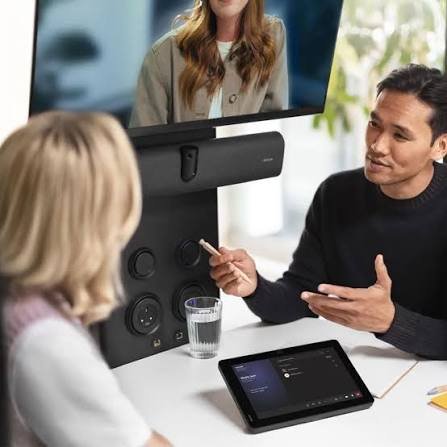
Less than 3% of small meeting rooms and huddle spaces worldwide are video-enabled. Millions of organisations have equipped their large boardrooms and medium conference rooms with professional video conferencing technology – and left their small rooms, phone booths, and huddle spaces behind. These spaces are where much of the real work actually happens. Where small teams gather for quick decisions, focused project discussions, and the kind of productive collaboration that open-plan desks cannot accommodate.
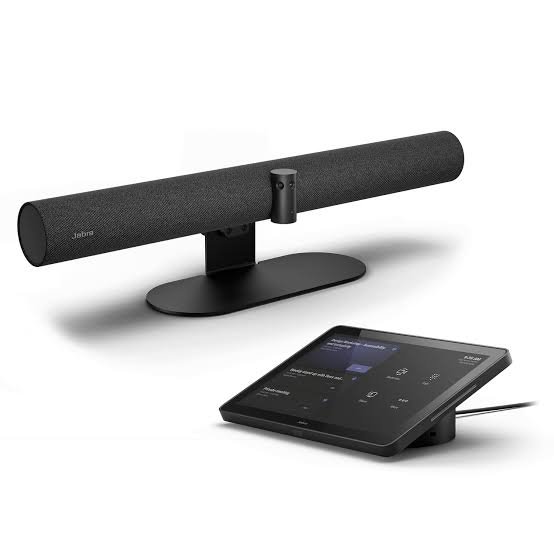
The Jabra PanaCast 40 Video Bar System was built specifically for these rooms – and this is the Microsoft Teams Rooms certified version, the complete package for organisations running Teams as their primary collaboration platform.
Two 8-megapixel cameras work in a precision dual-camera array, combined by Jabra’s real-time video stitching technology into a seamless 180-degree Panoramic-4K video stream – 3840×1080 at 30fps. Every person in the room is visible, including participants seated close to the screen at the edges of the table where a single wide-angle lens would distort or miss them. Four AI-powered video intelligence modes work continuously to deliver a professional, inclusive meeting experience for remote participants.
Intelligent Zoom dynamically frames all visible participants within 6 metres of the camera. Virtual Director uses AI speaker tracking to shift the camera focus to whoever is currently speaking. Dynamic Composition creates simultaneous close-up views of active speakers alongside a full room view. Intelligent Meeting Space lets you set virtual room boundaries – essential in glass-walled huddle rooms and open-plan adjacent spaces where external activity would otherwise appear in the video feed.
Six professional-grade beamforming microphones cover the room with a pickup range of up to 4.6 metres (15 feet), with Non-Speech Noise Suppression continuously removing keyboard sounds, HVAC hum, and other non-voice background noise. The integrated speaker delivers clear, full-duplex room audio.
The system runs on Android 13, built on the Microsoft Device Ecosystem Platform (MDEP) – the security-certified hardware foundation required for Microsoft Teams Rooms certification. Microsoft Teams Rooms on Android runs natively, providing the full, familiar Teams Rooms interface without requiring a separate meeting room PC. Manage the system, update firmware, and monitor usage remotely via Microsoft Teams Admin Center and Jabra+.
The included Jabra Control IP is a 10.1-inch touchscreen controller with an integrated stand – the dedicated meeting management interface for the room. It is powered by a single PoE Ethernet cable, keeping the table clean with no separate power supply at the controller. Two built-in PIR proximity sensors automatically wake the system when someone enters the room, so the meeting space is always ready. View the Teams calendar, join meetings with a single tap, manage participants, adjust the camera, and end calls – all from the Jabra Control IP without touching a laptop.
Microsoft Teams Cast enables wireless content sharing directly into the Teams meeting from any device – no cables, no additional apps required. A BYOD USB-C port is also available on the rear of the bar for laptop-driven sessions when needed. HDMI in accepts wired content from any source.
Installation takes under 12 minutes from unboxing to first meeting – the system is designed for minimal IT overhead, with in-box provisioning and flexible wall-mount installation included in the box. The privacy cover is also included. A table stand is available separately for rooms where the bar is preferred at table level rather than wall-mounted.
Compatible with Microsoft Teams Cast for wireless content sharing from any Windows device, and supported by Microsoft Teams Admin Center for enterprise fleet management at scale.
180 degrees. Every participant. Every word. Native Teams. Under 12 minutes.
KEY FEATURES
Microsoft Teams Rooms Certified – Native Teams on AndroidThe PanaCast 40 VBS Teams Room version runs Microsoft Teams Rooms on Android natively – the full Teams Rooms experience, certified by Microsoft, without requiring a separate meeting room PC. The familiar Teams interface gives users immediate confidence: they see the same meeting controls, the same calendar, the same one-touch join experience they know from Teams on any other device. Certification by Microsoft means the system has been tested and validated to meet the strict performance and integration requirements of the Teams Rooms on Android platform. The system is built on the Microsoft Device Ecosystem Platform (MDEP) – providing enterprise-grade security, robust remote management, and a future-ready foundation for Teams platform updates.
Jabra Control IP – 10.1-Inch Touch Controller with PIR Auto-WakeThe Jabra Control IP is included in the box – a dedicated 10.1-inch touchscreen meeting controller with an integrated stand, powered by a single PoE Ethernet cable. The clean, single-cable design means no power adapter is required at the controller – just route the Ethernet cable neatly out the back of the integrated stand. Two PIR (Passive Infrared) proximity sensors in the controller automatically detect when someone enters the room and wake the system – so the meeting room is always ready without any manual activation. The Jabra Control IP shows the full Teams calendar, allows one-touch meeting join, displays participant management controls, and provides camera and audio adjustment – everything needed to run a Teams Rooms meeting without a laptop.
Dual 8-Megapixel Cameras – 180-Degree Panoramic-4K CoverageTwo 8-megapixel cameras in a precision dual-camera array are combined by Jabra’s patented real-time video stitching technology into a single seamless 180-degree panoramic video output at 3840×1080 resolution and 30fps. No fisheye distortion. No missing participants. Every person at the table is visible at natural proportions – including those seated closest to the screen at the sides, which a single wide-angle lens would consistently miss in a small room. The 180-degree view is the default and cannot be manually reduced, ensuring the room always provides full coverage.
Intelligent Zoom – Dynamic Auto-Framing to 6 MetresIntelligent Zoom continuously analyses the 180-degree room view and dynamically adjusts the active frame to include all visible participants within 6 metres of the camera. People entering the room, changing seats, or moving around the table are automatically included in or excluded from the frame. Remote participants always see the right people without any manual PTZ adjustment from anyone in the room.
Virtual Director – AI Speaker TrackingVirtual Director uses both AI video analysis and audio intelligence to detect who is actively speaking and dynamically focus the frame on that person. The camera follows the active speaker, providing remote participants with a naturally directed, face-to-face meeting experience where their attention is guided to the current speaker – just as it would be in the room.
Dynamic Composition – Simultaneous Close-Ups and Room ViewDynamic Composition creates a tiled view of up to four active speakers simultaneously alongside a full panoramic room view. Remote participants see clear close-ups of the individuals currently engaged in conversation while the full room context remains visible – providing significantly more engagement and presence than a fixed wide-angle view.
Intelligent Meeting Space – Virtual Room BoundariesIntelligent Meeting Space allows the system administrator to define a virtual boundary within the physical room. Only what is inside the defined boundary is captured and transmitted – people and activity outside the boundary are excluded. This is particularly valuable in glass-walled huddle rooms, open-plan adjacent spaces, and rooms where external activity would otherwise appear in the video feed and distract remote participants.
Six Beamforming Microphones – 4.6 Metre PickupSix professional-grade beamforming microphones distributed across the front of the bar cover the entire room with a pickup range of up to 4.6 metres (15 feet). Intelligent beamforming algorithms continuously identify and track human voices, adapting directionally as speakers move. Automatic echo and noise cancellation remove interference before audio is transmitted.
Non-Speech Noise Suppression – AI Audio FilteringNon-Speech Noise Suppression uses on-device AI processing to identify sounds that are not human speech – keyboard typing, HVAC hum, air conditioning, paper shuffling, and other ambient environmental sounds – and remove them from the audio signal before transmission. Voices are delivered to remote participants clearly and intelligibly, without the background noise of a busy small room.
Integrated Speaker – Full-Duplex Room AudioThe integrated speaker provides clear, high-definition audio for in-room participants with full-duplex capability – both sides of the meeting can speak simultaneously without audio cutting out. The room is filled with clear, intelligible remote audio while the six-microphone array captures in-room audio simultaneously.
Android 13 on MDEP – Enterprise Security and Future-ReadinessRunning Android 13 on the Microsoft Device Ecosystem Platform (MDEP), the PanaCast 40 VBS Teams Room provides enterprise-grade security architecture, strict access controls, and the certified hardware platform that Microsoft requires for Teams Rooms on Android. MDEP ensures the system receives ongoing platform security updates, is ready for future Teams Rooms feature releases, and meets enterprise IT security requirements for managed meeting room deployments.
Microsoft Teams Cast – Wireless Content SharingMicrosoft Teams Cast enables wireless content sharing from any Windows device directly into the Teams meeting without additional hardware or apps. Participants share their screen wirelessly, removing the need for HDMI cables at the meeting table. HDMI input is also available for wired content sharing from any device.
BYOD USB-C Port – Platform FlexibilityA USB-C BYOD port on the rear of the bar allows a connected laptop to use the PanaCast 40’s cameras, microphones, and speaker as a USB audio/video device – enabling BYOD operation for guest users, visitors, or sessions where a laptop-driven platform connection is preferred. This flexibility means the system also functions as a high-quality room camera and audio system for any UC platform running on a connected device.
Box to Meeting in Under 12 MinutesThe PanaCast 40 VBS is packaged for rapid deployment – in-box provisioning allows the system to be configured without fully unboxing the product. Jabra states an installation time of under 12 minutes from unboxing to first meeting. Wall-mount hardware is included. The Jabra Control IP arrives pre-paired with the video bar and requires only a single PoE Ethernet cable.
Managed via Teams Admin Center and Jabra+IT administrators can monitor, configure, and update the PanaCast 40 VBS Teams Room system remotely via the Microsoft Teams Admin Center – the same platform used to manage all other Teams Rooms devices in the organisation. Jabra+ provides an additional cloud-based management layer for real-time firmware updates, device health monitoring, and deployment management. A single management workflow covers both the Teams platform and the Jabra hardware.
Camera Privacy Cover and Proximity SensorThe included privacy cover physically blocks the cameras when not in use – a hardware-level privacy protection that ensures no video is captured regardless of system state. The PIR proximity sensors in the Jabra Control IP detect room occupancy and automatically wake the system, ensuring the meeting room is always ready the moment a participant enters.
Easy-Clean Cover AvailableAn optional easy-clean bar cover is available separately for hygiene maintenance in shared meeting spaces – keeping the bar clean without removing or disconnecting any hardware.
WHO IS THIS FOR?
- Microsoft Teams-first organisations who need a certified, native Teams Rooms experience in small meeting rooms and huddle spaces without a separate meeting room PC
- IT departments deploying Teams Rooms at scale across multiple small rooms who need Microsoft Teams Admin Center management, MDEP security, in-box provisioning, and under-12-minute installation
- Small meeting rooms and huddle spaces for 2 to 8 participants currently unequipped with video conferencing, or equipped with inadequate solutions
- Glass-walled and open-plan adjacent rooms where Intelligent Meeting Space virtual boundaries prevent external activity from appearing in the video feed
- Organisations standardising their meeting room fleet on Teams Rooms who want a consistent experience, consistent management platform, and consistent certification standard across all room sizes
- Rooms that need both native Teams and BYOD capability – the USB-C BYOD port supports both without additional hardware
- Organisations valuing future-proof investment – built on MDEP with Warranty+ up to five years available, the system is engineered to receive ongoing Teams Rooms updates and platform improvements over its deployment lifetime
TECHNICAL SPECIFICATIONS
- Brand: Jabra
- Model: PanaCast 40 VBS – Microsoft Teams Rooms
- Type: Android-based all-in-one 180 small meeting room video bar system – Teams Rooms certified
- Platform: Android 13 on Microsoft Device Ecosystem Platform (MDEP)
- Colour: Black
- Number of Cameras: 2 (dual-camera precision array)
- Camera Resolution: 8 megapixels per camera
- Video Output Resolution: Panoramic-4K 3840×1080 @ 30fps | 4K Ultra-HD supported
- Field of View: Horizontal: 180 (fixed default – real-time dual-camera stitching)
- Digital Zoom: 4x
- Video Modes: Intelligent Zoom (up to 6m / 20ft) | Virtual Director | Dynamic Composition | Panoramic View
- Intelligent Meeting Space: Yes – configurable virtual room boundaries
- Number of Microphones: 6 (beamforming array)
- Microphone Pickup Range: Up to 4.6 metres (15 feet)
- Microphone Features: Beamforming | Non-Speech Noise Suppression | Echo cancellation
- Number of Speakers: 1 (integrated – full duplex)
- AUX Output: 3.5mm (assistive listening / external speakers)
- Connectivity: USB-C (BYOD) | USB-A | HDMI In (content sharing) | HDMI Out (display) | Ethernet RJ45
- Wireless Content Sharing: Microsoft Teams Cast
- BYOD: Yes – USB-C
- Platform Certification: Microsoft Teams Rooms (Android) – certified
- Remote Management: Microsoft Teams Admin Center | Jabra+ | Jabra WebConsole
- Ideal Room Size: Up to 5 × 5 metres (16 × 16 feet), 2-8 participants
- Setup Time: Under 12 minutes box to first meeting
- Touch Controller: Jabra Control IP – 10.1″ touchscreen | PoE-powered | integrated stand | 2 × PIR proximity sensors | pre-paired
- Camera Privacy Cover: Included
- Easy-Clean Cover: Optional (sold separately)
- Table Stand: Optional (sold separately)
- Warranty: 2 years standard | Warranty+ up to 5 years (available separately)
IN THE BOX
- Jabra PanaCast 40 VBS video bar (Microsoft Teams Rooms)
- Jabra Control IP 10.1″ touch controller with integrated stand (pre-paired)
- USB-C to USB-C cable 3m (9.8ft)
- Power supply
- Privacy cover
- HDMI cable 1.83m (6ft)
- Regional power cable
- Wall mount hardware
- Quick start guide
Note: Table stand sold separately (Jabra Table Stand 14307-71). PoE network connection required for Jabra Control IP; PoE injector kit available separately if PoE switch not available.
FREQUENTLY ASKED QUESTIONS
Q: What is included in the box and is this the complete meeting room system?
A: Yes – the PanaCast 40 VBS Microsoft Teams Rooms version is a complete, standalone meeting room system for small rooms. The box includes the video bar, the Jabra Control IP 10.1-inch touch controller with integrated stand, a 3-metre USB-C cable, power supply, privacy cover, HDMI cable, regional power cable, and wall mount hardware. The Jabra Control IP arrives pre-paired and requires only a PoE Ethernet cable to operate. No separate meeting room PC is required. The table stand is sold separately for rooms where a wall-mounted configuration is not preferred.
Q: What is the Jabra Control IP and how does it connect?
A: The Jabra Control IP is a dedicated 10.1-inch touchscreen meeting controller with an integrated stand – designed specifically to be the in-room management interface for the PanaCast 40 VBS. It connects to the network via a single RJ-45 Ethernet cable. PoE (Power over Ethernet) powers the controller through the network cable, so no separate power supply is needed at the controller. All ports are hidden beneath a removable cover with a single cable routed neatly out the back, keeping the table clutter-free. Two PIR proximity sensors in the controller detect when someone enters the room and wake the system automatically. The controller shows the full Teams calendar, allows one-touch meeting join, and provides complete meeting management from the room table.
Q: Does this require a meeting room PC?
A: No. The PanaCast 40 VBS Teams Rooms version runs Microsoft Teams Rooms on Android natively – no separate meeting room PC or laptop is required for standard Teams operation. The entire system – video bar, touch controller, and onboard Android operating system – is self-contained. For BYOD sessions where a connected laptop is preferred, the USB-C BYOD port on the rear of the bar supports direct laptop connection.
Q: What is Microsoft Teams Cast?
A: Microsoft Teams Cast is a wireless content sharing feature that allows any Windows device to share its screen directly into the Teams meeting without an HDMI cable. When a meeting is active and Microsoft Teams Cast is enabled, any Windows device on the same network can cast its content into the Teams session with a few clicks – no additional app installation, no cables, and no pucks required at the meeting table. This is available for the Teams Rooms version of the PanaCast 40 VBS.
Q: Can this be managed through the Microsoft Teams Admin Center?
A: Yes. The PanaCast 40 VBS Microsoft Teams Rooms version appears in the Microsoft Teams Admin Center as a managed Teams Rooms device – alongside all other Teams Rooms devices in the organisation. IT administrators can view device health, manage settings, push firmware updates, and monitor usage from the same admin interface used to manage the rest of the Teams environment. Jabra+ provides an additional management layer with real-time update capability and Jabra-specific device management.
Q: What are the PIR sensors and how do they help?
A: PIR (Passive Infrared) sensors in the Jabra Control IP detect heat signatures from human movement – detecting when someone enters the meeting room. When occupancy is detected, the system wakes automatically from sleep mode so the room is ready for immediate use. No one needs to press a button, touch the screen, or wait for the system to boot. The meeting room is always ready when participants arrive. This also conserves energy during periods when the room is unoccupied, as the system enters a low-power state automatically when no occupancy is detected.
Q: What video modes are available and how do I switch between them?
A: Four camera modes are available. Intelligent Zoom (the default) dynamically frames all visible participants within 6 metres. Virtual Director dynamically focuses on the active speaker. Dynamic Composition displays tiled close-ups of up to four active speakers alongside a full room view. Panoramic View shows a fixed 180-degree view of the full room. Switch between modes from the Jabra Control IP, Microsoft Teams Admin Center, or Jabra+ management platform.
Q: What is Intelligent Meeting Space?
A: Intelligent Meeting Space lets administrators define a virtual boundary within the physical room. Only activity inside the boundary is captured and transmitted. This is particularly valuable in glass-walled rooms where people passing outside would appear in the video, or in open-plan adjacent spaces where external activity would intrude. Configuration is done via the system settings interface or remote management.
Q: Does the PanaCast 40 VBS work as a BYOD system?
A: Yes. In addition to running Teams Rooms natively, the USB-C BYOD port on the rear of the bar allows any laptop to use the PanaCast 40’s cameras, microphones, and speaker as a USB audio/video device. This enables BYOD operation for guest users, visitors using other platforms, or any session where a laptop-driven connection is preferred. The same hardware serves both native Teams Rooms and BYOD modes.
Q: What is the difference between this Teams Rooms version and the UC BYOD version?
A: The Microsoft Teams Rooms version (this listing) runs Teams Rooms on Android natively, is certified by Microsoft, includes Microsoft Teams Admin Center management, supports Microsoft Teams Cast for wireless content sharing, and provides the full native Teams Rooms interface on the Jabra Control IP. It operates as a standalone meeting room system without a laptop. The UC BYOD version is configured for laptop-driven operation on any UC platform via USB-C, without native platform certification. Choose Teams Rooms for a native, standalone Teams meeting room experience. Choose UC for maximum platform flexibility or BYOD-first operation.
Q: What warranty does the Jabra PanaCast 40 VBS come with?
A: The PanaCast 40 VBS comes with a standard 2-year manufacturer warranty. Extended warranty via Jabra’s Warranty+ programme extends coverage to up to five years.
WHY CHOOSE JABRA?
Jabra is part of GN Group, a world leader in intelligent audio and video solutions with over 150 years of engineering heritage. The PanaCast 40 VBS is the newest addition to Jabra’s meeting room portfolio – launched in February 2025 to address the vast majority of small meeting rooms that remain unequipped with professional video conferencing. The Teams Rooms version brings together Jabra’s 180-degree video engineering, six-microphone audio expertise, and Microsoft’s certified Teams Rooms platform in the smallest, fastest-deploying, and most IT-manageable package available for small rooms.
For organisations standardising on Microsoft Teams who want every room – large and small – equipped to the same professional standard, the PanaCast 40 VBS Teams Rooms version is the answer.
THE BOTTOM LINE
The Jabra PanaCast 40 Video Bar System – Microsoft Teams Rooms is the complete small room Teams Rooms solution, ready in under 12 minutes.
Dual 8MP cameras with patented 180-degree panoramic stitching. Intelligent Zoom to 6 metres. Virtual Director, Dynamic Composition, Intelligent Meeting Space. Six beamforming microphones with Non-Speech Noise Suppression. Full-duplex integrated speaker. Android 13 on MDEP. Microsoft Teams Rooms certified. Jabra Control IP 10.1″ touch controller with PIR auto-wake, included and pre-paired. Microsoft Teams Cast wireless content sharing. BYOD USB-C. HDMI in and out. Ethernet. Teams Admin Center management. Jabra+ remote updates. Privacy cover included. Under 12 minutes box to first meeting. Warranty+ up to 5 years.
For South African businesses equipping small meeting rooms with a native, secure, professionally managed Microsoft Teams Rooms experience – the Jabra PanaCast 40 VBS is the device that makes every small room a fully capable Teams room.
180 degrees. Every participant. Every word. Native Teams. All day.
What’s in the box
1 x Jabra PanaCast 40 VBS video bar (Microsoft Teams Rooms)
1 x Jabra Control IP 10.1″ touch controller with integrated stand (pre-paired)
1 x USB-C to USB-C cable 3m (9.8ft)
1 x Power supply
1 x Privacy cover
1 x HDMI cable 1.83m (6ft)
1 x Regional power cable
1 x Wall mount hardware
1 x Quick start guide


Reviews
There are no reviews yet.